We all know that, for the most part, all devices have an IP rating. Do you have any idea what this IP rating means? If this is something new to you, you've come to the correct place since we'll talk about it here.
What exactly is an IP rating?
An IP rating, also known as an Ingress Protection (IP) rating, is a standardized measure of the level of protection provided by a device's enclosure against the intrusion of solid objects (including body parts like hands and fingers), dust, and moisture. The IP rating is expressed as two numbers, such as IP67. The first number in an IP rating indicates the level of protection against solid objects. It ranges from 0 to 6, with 0 indicating no protection and 6 indicating complete protection against dust and other solid objects. The second number in an IP rating indicates the level of protection against moisture. It ranges from 0 to 8, with 0 indicating no protection and 8 indicating protection against continuous immersion in water. For example, an IP rating of IP67 indicates that a device has a high level of protection against solid objects (6 out of 6) and can withstand being immersed in water for up to 30 minutes at a depth of up to 1 meter (7 out of 8). IP ratings are commonly used to classify the degree of protection provided by enclosures for electrical and electronic equipment, such as smartphones and tablets. A device with a higher IP rating is better protected against dust, moisture, and other potential sources of damage. The electrical enclosure's sealing effectiveness gets defined by the IP rating. It has something to do with protecting against foreign bodies and moisture ingress. The gadget can be affected by moisture and foreign bodies, and its IP rating indicates the extent to which the device can withstand the effect. Most individuals are perplexed by the IPX7 and IP67 grades. We'll go over both of them in-depth here.
IPX7
We'll start with an explanation of what IPX7 and IP67 signify. So now you know that the first number in the IP rating is for dust protection, and the second number is for water resistance level, thanks to the basic information we supplied above. In IPX7, the first number has been replaced with an X, indicating that products with this classification do not need to test for dust resistance. The number 7 appears in the second position, indicating the device's level of water resistance. IPX7 is a specific type of IP rating that indicates a high level of protection against water. The IPX7 rating signifies that a device is protected against immersion in water up to a depth of 1 meter for up to 30 minutes. An IP rating is a standardized measure of the level of protection provided by a device's enclosure against the intrusion of solid objects (including body parts like hands and fingers), dust, and moisture. The IP rating is expressed as two numbers, such as IPX7. The first number in an IP rating indicates the level of protection against solid objects. It ranges from 0 to 6, with 0 indicating no protection and 6 indicating complete protection against dust and other solid objects. The second number in an IP rating indicates the level of protection against moisture. It ranges from 0 to 8, with 0 indicating no protection and 8 indicating protection against continuous immersion in water. In the case of IPX7, the first number is "X," which means that the level of protection against solid objects is not specified. The second number is "7," which indicates that the device is protected against immersion in water up to a depth of 1 meter for up to 30 minutes. IP ratings are commonly used to classify the degree of protection provided by enclosures for electrical and electronic equipment, such as smartphones and tablets. A device with a higher IP rating is better protected against dust, moisture, and other potential sources of damage.
IP67
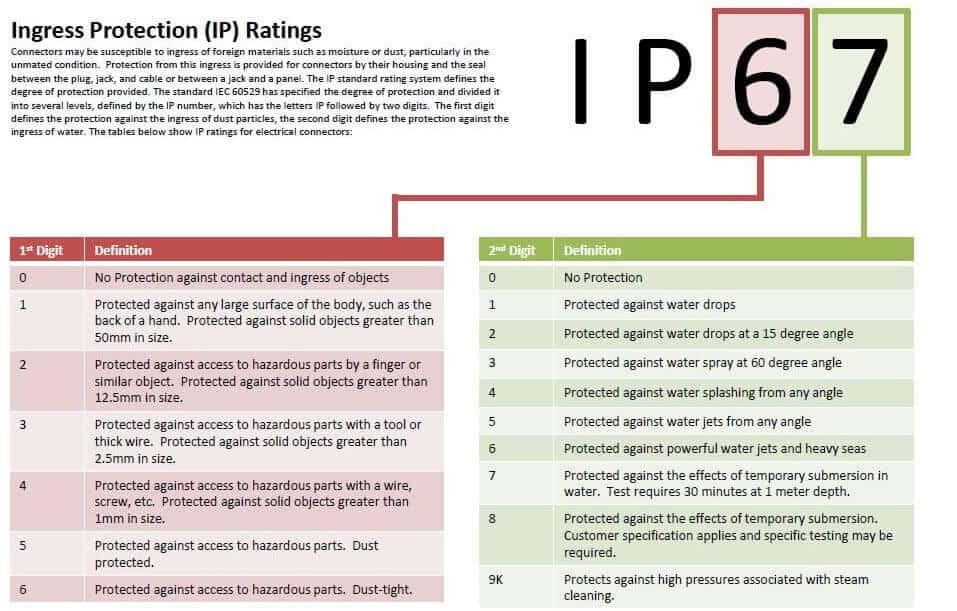
This topic will discuss in conjunction with the next grade, IP67. Both rating places in IP67 have a number assigned to them, with 6 being the dustproof level and 7 being the waterproof letter. The maximum number assigned to a fully dustproof gadget is 6, which means that devices with this certification will perform best when exposed to dust. IP67 is a specific type of IP rating that indicates a high level of protection against both dust and water. The IP67 rating signifies that a device is completely protected against dust and can withstand being immersed in water up to a depth of 1 meter for up to 30 minutes. An IP rating is a standardized measure of the level of protection provided by a device's enclosure against the intrusion of solid objects (including body parts like hands and fingers), dust, and moisture. The IP rating is expressed as two numbers, such as IP67. The first number in an IP rating indicates the level of protection against solid objects. It ranges from 0 to 6, with 0 indicating no protection and 6 indicating complete protection against dust and other solid objects. The second number in an IP rating indicates the level of protection against moisture. It ranges from 0 to 8, with 0 indicating no protection and 8 indicating protection against continuous immersion in water. In the case of IP67, the first number is "6," which indicates that the device is completely protected against dust. The second number is "7," which indicates that the device is protected against immersion in water up to a depth of 1 meter for up to 30 minutes. IP ratings are commonly used to classify the degree of protection provided by enclosures for electrical and electronic equipment, such as smartphones and tablets. A device with a higher IP rating is better protected against dust, moisture, and other potential sources of damage.
Which IP rating is superior to the others?
When comparing IP67 with IP67, we must give IP67 the edge because IP67-rated gadgets offer excellent dust and water resistance. However, goods with an IPX7 grade provide water protection, which can be dangerous if the device gets used frequently outside. Even if your device is entirely waterproof, you won't be able to protect it from dust in these situations, and dust is one of the most common causes of tiny faults in the circuit or other hardware.
IP67 vs. IPX7: What's the Difference?
The main difference between IP67 and IPX7 is the level of protection they provide against solid objects. IP67 provides complete protection against dust, while IPX7 does not specify a level of protection against solid objects.
- When we talk about IP67, we're talking about the dustproof product. As a result, dust particles get prevented from entering the product, which is entirely sealed and protected.
- Any product that has an IP67 designation is water-resistant. It can stay in the water for up to 30 minutes at a depth of 1 meter. As a result, if you ever get caught in the rain, you will not be harmed.
- When it comes to IPX7, the product has a water resistance grade of 7 and can stay in the water for up to 30 minutes. As a result, coming into contact with water will have no negative consequences.
- The X in IPX7, on the other hand, implies that the manufacturers have not tested the device to see if it can tolerate dust particles. It is why a product's IP rating displays an X instead of a number.